
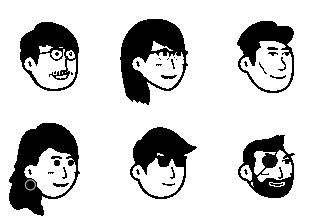
Getting Started with Notion Avatar Maker
Learn how to create your perfect Notion-style avatar in minutes. This guide covers all the basics of customizing facial features, hairstyles, accessories, and more.
Welcome to Notion Avatar Maker! Creating your unique hand-drawn style avatar has never been easier. In this guide, we'll walk you through everything you need to know to create the perfect avatar for your Notion workspace, social media profiles, or any other platform.
Why Use Notion-Style Avatars?
Notion-style avatars have become incredibly popular for several reasons:
- Clean and minimalist design that works in any context
- Hand-drawn aesthetic that feels personal and approachable
- Highly customizable to match your unique personality
- Works everywhere - from professional profiles to casual social media
Getting Started
Step 1: Choose Your Face Shape
The face is the foundation of your avatar. We offer 16 different face shapes ranging from round to oval to square. Pick one that best represents you or simply choose one that appeals to you visually.
Step 2: Add Facial Features
Next, customize your facial features:
- Eyes: Choose from 14 unique eye styles
- Eyebrows: Express yourself with 16 eyebrow options
- Nose: Pick from 14 nose designs
- Mouth: Select from 20 mouth expressions
Step 3: Style Your Hair
Your hairstyle says a lot about you! We have an extensive collection of 59 hairstyles to choose from, including:
- Short and neat cuts
- Long flowing styles
- Curly and wavy options
- Fun and creative designs
Step 4: Add Accessories
Make your avatar unique with accessories:
- Glasses: 15 styles from classic to trendy
- Beard: 17 beard and facial hair options
- Accessories: 15 fun additions like headphones, bows, and more
- Details: 14 extra touches like freckles and blush
Pro Tips
Here are some tips to make your avatar stand out:
-
Keep it simple - Sometimes less is more. A clean avatar with fewer accessories can be more memorable.
-
Match your style - Try to capture something about your real appearance or personality.
-
Use the flip feature - Don't forget you can flip your avatar horizontally if the orientation doesn't feel right.
-
Experiment with backgrounds - The background color or shape can completely change the vibe of your avatar.
-
Try the random button - Feeling adventurous? Hit the dice button and let fate decide!
Using Your Avatar
Once you've created your perfect avatar, you can:
- Download as SVG for crisp, scalable graphics
- Download as PNG for universal compatibility
- Embed directly in websites or applications
- Share on social media with one click
Commercial Use
All avatars created with Notion Avatar Maker are released under the CC0 license, which means:
- ✅ Use for personal projects
- ✅ Use for commercial projects
- ✅ Modify and adapt as needed
- ✅ No attribution required
Try Our AI Features
Want something even more unique? Check out our AI Avatar Generator that can:
- Transform your photos into Notion-style avatars
- Generate avatars from text descriptions
- Create truly one-of-a-kind designs
Ready to create your avatar? Head back to the homepage and start designing! We can't wait to see what you create.